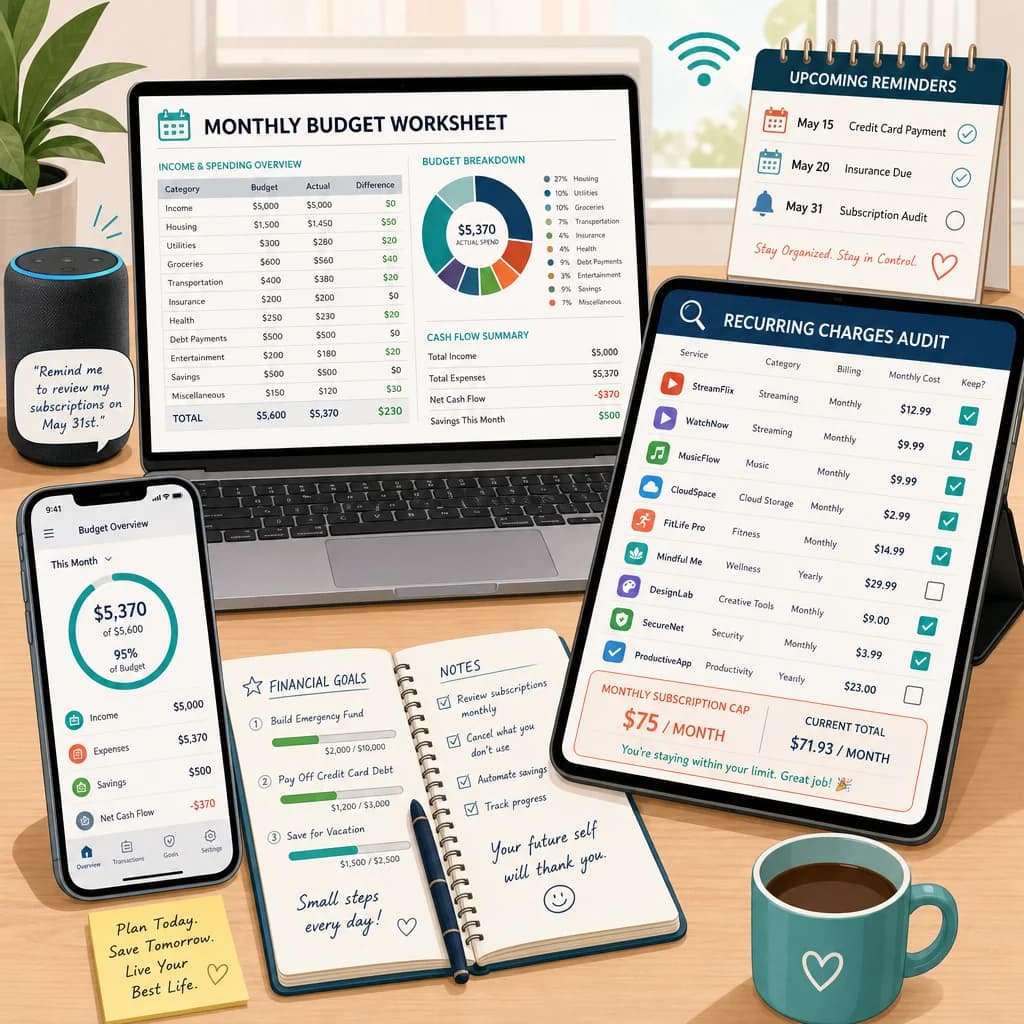
If you want to know how to budget for subscriptions, start by treating recurring charges like a budget category instead of background noise. Streaming services, apps, software, memberships, cloud storage, and free trials often feel small on their own, but together they can quietly crowd out savings, groceries, or debt payoff.
In 2026, subscription creep is one of the easiest ways to lose control of a monthly budget. You sign up for one low-cost service, forget an annual renewal, share a few family plans, and suddenly your bank statement is full of charges you barely notice. The fix is not guilt. It is a simple system for finding every recurring expense, deciding what stays, and setting a cap that fits the rest of your budget.
This guide walks through a practical subscription audit you can do in under 15 minutes. You will learn how to spot forgotten subscriptions, compare monthly versus annual billing, decide what to keep or cancel, and build a subscription budget that does not keep leaking money every month.
What subscription creep is
Subscription creep is when recurring charges slowly pile up until they take a bigger share of your budget than you intended. It usually happens a little at a time: another streaming service, a meal kit you forgot to pause, a software trial that rolled into autopay, or a family membership that no longer gets used.
The problem is not just the total cost. It is that recurring subscriptions feel invisible. Unlike a large one-time purchase, they blend into your statement and keep renewing until you stop them. That is why subscription creep matters so much for beginners. Small leaks are still leaks.
Why subscription budgeting matters in 2026
More household spending now runs through recurring billing. Entertainment, productivity tools, fitness apps, cloud storage, grocery delivery memberships, and software plans all compete for the same paycheck. Federal Reserve payment data continues to show how digital and card-based spending dominates daily life, which makes recurring charges easier to ignore until the total becomes painful.
A subscription budget gives those charges a clear place in your plan. Instead of wondering why your money feels tighter than it should, you decide upfront how much monthly subscription cost your budget can support. That makes it easier to protect savings goals and avoid death-by-autopay.
Step 1: List every recurring charge
The first step is a full audit. Open your credit card statement, bank statement, and app store subscriptions. Look back at least two to three months so you catch charges that do not hit on the same date every month.
How to track forgotten subscriptions
- Scan bank and card statements for repeated merchant names
- Check Apple App Store, Google Play, Amazon, and PayPal recurring billing settings
- Look for annual renewals that only show up once a year
- Check email for receipts, trial endings, renewal notices, and membership confirmations
- Ask family members about shared plans so you do not miss hidden duplicate services
Write down the service name, amount, billing cycle, next renewal date, and who uses it. Include streaming services, gym memberships, software tools, meal kits, gaming subscriptions, cloud storage, newsletters, and any free trial close to renewal.
Step 2: Separate must-keep vs nice-to-have subscriptions
Once you have the full list, stop thinking of every subscription as equal. Some services support daily life or work. Others are convenience purchases you would barely miss. The goal is not to cancel everything. The goal is to sort recurring expenses by value.
- Must-keep: internet security software you rely on, essential work tools, or a low-cost family plan everyone uses
- Nice-to-have: extra streaming platforms, niche apps, premium upgrades, or duplicate music or video services
- Low-value: services you forgot about, trials you never meant to keep, or memberships used less than once a month
A fast way to decide is to ask three questions: Did I use this in the last 30 days? Would I notice if it disappeared tomorrow? Is there a cheaper version or shared plan that covers the same need?
Streaming services vs software tools
Streaming services are often easier to rotate because the value changes month to month. Software tools are trickier because they may be tied to work, storage, or files you still need. That is why you should judge subscriptions by function, not by habit. A service you use daily for income is very different from a fifth streaming platform you open once a month.
Step 3: Decide your monthly subscription cap
A subscription budget needs a hard number. Without a cap, recurring charges will expand to fill whatever room your checking account seems to have. A monthly cap keeps the category visible and forces tradeoffs when a new service shows up.
A simple method is this: total your current subscriptions, compare that number to your overall budget, then choose a cap you can sustain without hurting essentials, savings, or debt payments. For many households, the right cap is not a universal percent. It is the amount that still leaves the rest of the budget working.
- Start with your real current total, not your ideal total
- Cut obvious waste first before setting the final cap
- Leave a little room for one intentional entertainment or tool upgrade
- If money is tight, treat the cap like a fixed bill and do not go over it
Fixed vs variable subscription costs
Some subscriptions act like fixed expenses because they are essential and predictable. Others are flexible and should be treated more like wants. If your budget is under pressure, cut flexible subscription spending before you touch core bills, groceries, transportation, or minimum debt payments.
Step 4: Handle annual renewals the right way
Annual subscriptions are where many budgets get blindsided. A yearly charge can look cheaper on paper, but it still needs planning. If you pay annually, divide the cost by 12 and reserve that amount each month so the renewal does not feel like a surprise bill.
Monthly vs annual billing
- Choose annual billing when the service is truly essential, the discount is real, and you can plan for the renewal
- Choose monthly billing when your usage changes, you are testing the service, or you may cancel soon
- Track annual renewals in your calendar so they do not ambush your checking account
- If the annual bill is large, use a sinking fund so the money is waiting when renewal time comes
This is one of the biggest gaps in generic advice. Annual billing is not automatically better. It is only better if the service earns a permanent spot in your budget and the prepayment does not create stress elsewhere.
Step 5: Cancel, downgrade, or rotate subscriptions
After the audit, every non-essential subscription should land in one of three buckets: keep, downgrade, or cancel. If you still want the service but not the price, check for a cheaper plan, ad-supported version, lower storage tier, or family sharing option. If you only use it seasonally, rotate it instead of paying year-round.
- Cancel forgotten trials first because they add no value
- Downgrade services with extra features you do not use
- Rotate streaming services one or two at a time instead of keeping all of them active
- Review family sharing so one plan covers the household without duplicate charges
FTC subscription and cancellation guidance is useful here: take screenshots of cancellation confirmations, save the final email, and make sure autopay actually stops. If a service makes cancellation harder than sign-up, that is one more reason to remove it.
Step 6: Review subscriptions every month
A subscription audit is not a one-time cleanup. Recurring expenses need a quick monthly review, especially when free trials, annual renewals, and shared plans are involved. Add a five-minute check to your normal budget routine so the category stays under control.
How to budget subscriptions on a tight income
If your money already feels tight, subscriptions should compete with other wants, not with essentials. Keep only the services you use often enough to justify the cost, set a lower cap, and pause anything that is mainly convenience. A tight budget does not mean you need zero subscriptions. It means every recurring charge needs a clear reason to stay.
Subscription budgeting for families
Families usually need a different approach because the same service may be shared by several people. Review whether a family plan is actually cheaper than separate accounts, decide who uses each subscription, and make one person responsible for tracking renewals. That reduces duplicate charges and the classic problem where everyone assumes someone else is managing it.
Common mistakes to avoid
- Looking at only one month of statements and missing annual renewals
- Keeping subscriptions just because the individual charge feels small
- Paying annually without planning for the renewal
- Forgetting app store trials and shared family accounts
- Setting no subscription cap at all
- Canceling a service without checking whether autopay actually stopped
CFPB budgeting advice supports the bigger habit here: make recurring costs visible, review them often, and fit them into the wider spending plan. Subscription control is not separate from budgeting. It is part of how you protect margin in the rest of your life.
FAQ
Are subscriptions fixed expenses?
Some are. Essential subscriptions you plan to keep can act like fixed expenses, but many recurring subscriptions are flexible wants. The smart move is to separate must-keep services from optional ones.
How often should I audit subscriptions?
Do a full subscription audit now, then review the category every month. A deeper check every quarter also helps you catch annual renewals and forgotten trials.
Should I pay monthly or annually?
Pay annually only when the service is essential, the discount is meaningful, and you have a plan for the renewal. Monthly billing is safer when usage may change or cancellation is likely.
What if I share subscriptions with family?
Track shared services in one place, confirm who uses them, and compare family-plan pricing with separate accounts. Shared subscriptions can save money, but they can also hide duplicate costs.
How do I stop subscription creep?
List every recurring charge, sort each one into keep, downgrade, rotate, or cancel, and set a monthly subscription cap you will not exceed. That is the fastest way to stop subscription creep from draining your budget.
Do a 15-minute subscription audit today, cancel the lowest-value charge first, and set a monthly cap before the next renewal hits.
Take control of your money today
Start free with Spendmate — track expenses, plan budgets, and reach your financial goals.
Start free with Spendmate