
If you feel like money disappears from your account every month and you are not sure where it goes — you are not imagining it. The average US household now pays for 12 to 15 active subscriptions totaling $347 per month, according to a 2026 Citizens Bank spending survey. And here is the kicker: 4 to 6 of those subscriptions are forgotten or barely used, wasting an average of $47 per month. That is $564 per year vanishing into services you do not need. But there is good news: This is a solvable problem. In about 30 minutes, you can run a subscription audit, find the leaks, and reclaim $100 or more per month without downsizing your life. Here is exactly how to do it.
What Is a Subscription Audit?
A subscription audit is a systematic review of every recurring charge in your name. You go through your bank statements, credit cards, and app store accounts to find every subscription service you are paying for. Then you evaluate each one: Is this worth it? Do I actually use this? Could I get the same value for less or nothing? The goal is simple — keep what delivers real value, cancel what does not.
The Subscription Problem — Why You Are Losing Money Without Knowing It
Subscription creep is real, and it is sneakier than most people realize. Unlike a one-time purchase, a recurring charge fades into the background of your bank statement. You sign up, you forget, you keep paying. It is not because you are bad with money — it is by design.
The Numbers (2026 Data)
The average US household now carries 12 to 15 active subscriptions, according to a 2026 Citizens Bank survey on consumer spending habits. That includes streaming services, gym memberships, cloud storage, news apps, food delivery perks, and more. At an average of $347 per month, that is $4,164 per year — before you even notice it. The most shocking part: 4 to 6 of those subscriptions are either forgotten or barely used, burning roughly $47 every month, per the same Citizens Bank research. Over a year, that is $564 gone for nothing.
Why Subscription Creep Happens
Three design patterns drive subscription creep. First, free trial traps: you sign up for a 30-day free trial, forget to cancel, and wake up to your first charged bill. Second, auto-renewal by default: most subscriptions quietly roll into annual or monthly renewals unless you actively opt out. Third, the psychology of small amounts: $9.99 does not feel like a lot alone, but 10 of them together quietly drain your budget. Add bundled services that hide individual costs, and you have a perfect storm for invisible spending.
The Psychology of Forgetting
Digital charges feel different from cash. When you hand over a $20 bill, you feel it. When $20 auto-debits from your account, it barely registers. This is called out of sight, out of mind, and it is why subscription waste is so common. There is also the sunk cost fallacy: you paid for an annual subscription, so you feel obligated to use it even when you are not. And then there is decision fatigue — it is easier to ignore subscriptions than to evaluate them one by one. A subscription audit breaks this cycle.
Step 1 — Gather Your Data (The 30-Minute Setup)
Before you can cut anything, you need to see everything. This step takes about 30 minutes and requires you to collect your financial statements. Do not skip this — you cannot audit what you cannot see.
What You Need
- Last 3 months of bank statements (checking and savings accounts)
- Last 3 months of credit card statements
- A spreadsheet or notebook for your audit list
- About 30 minutes of uninterrupted time
Where Subscriptions Hide
Subscriptions do not only appear in your bank account. They scatter across multiple payment methods. Check your bank account auto-debits, credit card recurring charges, App Store subscriptions on iOS, Google Play subscriptions on Android, PayPal recurring payments, and Amazon Prime channels or add-ons. Go through every account you have. This is also a good time to look at your direct debits — some subscriptions pull directly from your checking account.
Pro Tip: Use Your Bank Subscription Finder
Many banks and credit card issuers now offer built-in subscription detection tools that scan your transactions and flag recurring charges. Chase, Capital One, and Wells Fargo all have this feature. If your bank has it, turn it on. It catches things you would otherwise miss. That said, always verify manually — algorithm-based finders are not perfect and sometimes miss smaller charges.
Step 2 — List Every Single Subscription (The Brain Dump)
Now that you have your data, it is time to list everything. Be thorough. Write down every recurring charge, no matter how small. That $2.99 per month charge adds up to $35.88 per year.
Categories to Check
- Streaming: Netflix, Hulu, Disney+, Max, Peacock, Paramount+, Apple TV+, HBO
- Music: Spotify, Apple Music, YouTube Music, Tidal, Amazon Music
- Fitness: Gym memberships, Peloton, ClassPass, fitness apps (Nike Training Club, Fitbit Premium)
- Software: Adobe Creative Cloud, Microsoft 365, Canva, Notion, Dropbox
- News and Magazines: New York Times, Wall Street Journal, Medium, Substack
- Shopping: Amazon Prime, Walmart+, Costco membership, Sam's Club
- Food and Delivery: DoorDash DashPass, Uber Eats+, GrubHub+, Instacart
- Cloud Storage: iCloud, Google One, Dropbox, Microsoft OneDrive
- Dating Apps: Tinder Gold, Bumble Premium, Hinge Preferred
- Gaming: Xbox Game Pass, PlayStation Plus, Nintendo Switch Online, EA Play
- Other: Meditation apps (Calm, Headspace), language learning (Duolingo Plus)
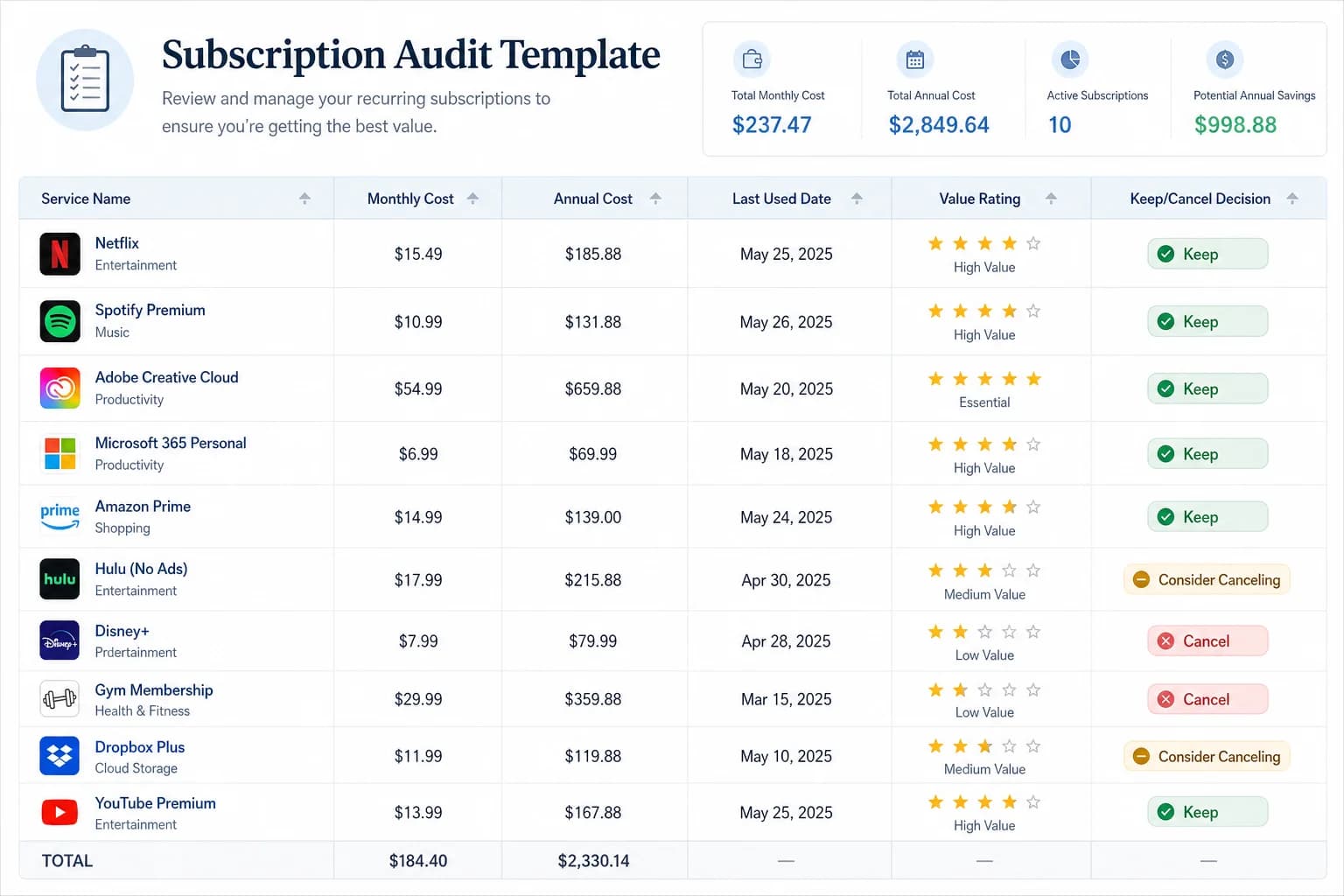
Template: Subscription Audit Spreadsheet
Create a simple spreadsheet with these columns: Service Name, Monthly Cost, Annual Cost, Last Used, Value Rating (1–5), and Keep/Cancel Decision. Below is an example of what your completed audit might look like.
- Netflix — $15.49/month — $185.88/year — Used yesterday — Rating: 4 — Keep
- Gym Membership — $45.00/month — $540.00/year — Last used 3 months ago — Rating: 2 — Cancel
- Adobe Creative Cloud — $54.99/month — $659.88/year — Used weekly — Rating: 5 — Keep
- Disney+ — $13.99/month — $167.88/year — Used 2 weeks ago — Rating: 3 — Keep (rotate)
- iCloud Storage — $2.99/month — $35.88/year — Active daily — Rating: 5 — Keep
- Headspace — $69.99/year — $69.99/year — Not opened in 6 months — Rating: 1 — Cancel
Step 3 — Evaluate Each Subscription (The Decision Framework)
Now comes the judgment call. For each subscription on your list, ask yourself these four questions. This is not about deprivation — it is about intentionality. Some subscriptions genuinely add value to your life. Keep those. Cancel the rest.
Question 1: When Did I Last Use This?
- Used in the last 7 days: Strong keep candidate
- Used in the last 30 days: Moderate keep candidate
- Used in the last 90 days: Questionable — requires justification
- Not used in 90+ days: Strong cancel candidate
Question 2: Does This Add Measurable Value?
Value can be entertainment (joy, relaxation, connection), practical (saves time, solves a problem, earns you money), or health-related (fitness, mental health, medical). If your answer for why you keep it is vague or unconvincing, it is probably a cancel candidate.
Question 3: Could I Replace This With Something Free or Lower-Cost?
- Library streaming: Kanopy and Hoopla are free with a public library card
- Ad-supported tiers: Spotify Free, YouTube with ads, Peacock free tier
- Shared family plans: Split the cost with family or friends
- Rotating subscriptions: Subscribe for 1 month, binge what you want, cancel, and rotate to another service
Question 4: Am I Keeping This Out of Guilt or Sunk Cost?
If your reasoning is I paid for the annual plan so I have to use it, that is the sunk cost fallacy talking. You already paid — the money is gone regardless. The question is whether continuing to use it going forward adds value. If I might use it someday is your reason, that is magical thinking. If a family member or partner uses the subscription and you are on the fence, have a conversation — maybe they can share the cost or take it over.
Decision Matrix
Use this quick-reference table to make your keep versus cancel decisions.
- Used within 7 days + Value Rating 4-5: Definitely Keep
- Used within 30 days + Value Rating 3-5: Keep, re-evaluate in 60 days
- Used within 90 days + Value Rating 2-3: Trial Cancel — pause for 1 month and see if you miss it
- Not used in 90+ days + Value Rating 1-2: Cancel immediately
- Any subscription with Value Rating 1: Cancel immediately, no questions asked
Step 4 — Cancel Strategically (Avoiding Traps)
Canceling is not always straightforward. Companies spend significant resources designing cancellation experiences that are deliberately frustrating. Here is how to navigate them.
Before You Cancel: Check These Options First
- Annual vs. monthly: If you truly use a service year-round, annual billing often costs less per month. Run the math.
- Family plan: Can you split the cost with someone? Many services offer significantly discounted family or shared plans.
- Downgrade option: Some services have lower tiers with fewer features. Before canceling, ask if a downgrade makes sense.
- Pause option: A few services — particularly gyms and some software — allow you to suspend your subscription temporarily instead of canceling.
How to Cancel (Service by Service)
For most streaming services, cancellation is available in your online account settings. App Store subscriptions (iOS) and Google Play subscriptions must be canceled through the app store itself — not through the app directly. Gym memberships often require written notice or an in-person visit, and some contracts include early termination fees. Always read the fine print before signing up for annual commitments. For software subscriptions, online cancellation is usually available, but watch for retention offers designed to lure you back.
Watch Out for Cancellation Traps
- Dark patterns: Some companies hide the cancel button behind multiple menus or require you to chat with a bot first. Be persistent.
- Retention offers: 50% off for the next 3 months! Only accept this if you genuinely want to keep the service — not just because the discount feels like a good deal.
- Immediate vs. end-of-billing-period access: Know exactly when your access ends after cancellation so you are not caught off guard.
- Confirmation emails: Always save your cancellation confirmation. This is your proof if you get charged again by mistake.
Step 5 — Calculate Your Savings (The Victory Lap)
This is the rewarding part. Tally up what you have canceled and calculate what that means for your monthly and annual budget.
Tally the Numbers
- Total monthly subscriptions before audit: $_____
- Total monthly subscriptions after audit: $_____
- Monthly savings: $_____
- Annual savings: $_____ (multiply monthly savings by 12)
What Could You Do With This Money?
Redirecting your recovered money is just as important as finding it. If you do not have an explicit plan for it, lifestyle creep will absorb it within a month. Here are three high-impact options: Building an emergency fund is the foundation of financial security — even $500 set aside covers most unexpected car repairs or medical bills. If you carry credit card debt, an extra $50–100 per month toward payments saves you hundreds in interest over time. And if you are looking for a simple budgeting framework to manage your money going forward, the 50/30/20 rule is one of the most straightforward methods for allocating your income intentionally.
One practical approach: set up an automatic transfer the day after your subscription charges hit. Move the savings to a separate savings account immediately. Out of sight, out of mind — in a good way. Do not let lifestyle creep quietly bring those subscriptions back.
Step 6 — Prevent Subscription Creep (The Maintenance System)
The audit only works if you maintain it. Without a system, most people find themselves back at square one within six months. Here is how to prevent that.
Set Up Quarterly Audits
Block out 15 minutes four times a year — the first weekend of January, April, July, and October. This is not a full audit, just a quick check-in. Review any new subscriptions you have added since the last audit and evaluate whether they are worth keeping. Use a recurring calendar reminder so it actually happens.
Use a Subscription Tracker
Apps like Rocket Money, Truebill, and Bobby automatically detect and categorize your recurring charges. If you prefer a manual approach, a simple spreadsheet works just as well. The goal is to have one place where you can see every subscription you pay for, updated in real time. Some banks also offer recurring charge categorization — enable it if it is available.
Rules for Future Subscriptions
- 48-hour rule: Wait 48 hours before signing up for any new subscription. If you still want it after two days, it is a deliberate choice.
- One-in-one-out rule: Adding a new subscription? Cancel an existing one first. No exceptions.
- Free trial calendar rule: The moment you start a free trial, set a calendar reminder for two days before it expires.
- Annual only if 100% certain: Monthly subscriptions offer flexibility. Annual subscriptions offer a discount — but only if you are absolutely sure you will use it.
Common Subscription Audit Mistakes to Avoid
Even with the best intentions, people make predictable mistakes during and after a subscription audit.
Mistake 1: Canceling Everything (Deprivation Backlash)
Going cold turkey on all subscriptions often leads to rebound spending. If you love streaming movies or listening to music, keeping one high-value subscription is not a guilty pleasure — it is a deliberate choice. The goal is intentionality, not elimination.
Mistake 2: Forgetting to Cancel Free Trials
Free trials are designed to be forgotten. Set a calendar reminder the moment you sign up — not the day before, because you will be busy. The reminder should fire two days before the trial ends to give you time to decide.
Mistake 3: Not Checking All Payment Methods
If you only check your checking account, you will miss subscriptions on your credit card. Review every payment method you have — bank accounts, credit cards, PayPal, Apple Pay, Google Pay. Every single one.
Mistake 4: Skipping the Maintenance System
Most people feel great immediately after an audit. Six months later, the subscriptions have quietly crept back. Quarterly reviews are not optional — they are the only thing that makes the audit lasting.
FAQ — Subscription Audit
- How many subscriptions does the average person have?
- The average US household carries 12 to 15 active subscriptions totaling approximately $347 per month, according to a 2026 Citizens Bank spending survey. That number has steadily increased over the past decade as more services shift from one-time purchases to recurring models.
- How much money can I save with a subscription audit?
- Most people find 4 to 6 forgotten or underused subscriptions worth canceling, averaging $47 per month in recovered funds. That is $564 per year — a meaningful amount that could fund an emergency fund, pay down debt, or accelerate savings goals.
- What is the easiest way to track subscriptions?
- Use a subscription tracker app like Rocket Money or Truebill, which automatically detect recurring charges. Alternatively, maintain a simple spreadsheet with all subscriptions, costs, and renewal dates.
- Should I cancel all my streaming services?
- Not necessarily. If you actively use streaming services for entertainment, relaxation, or shared viewing with family, keeping 1 or 2 makes sense. The goal is not zero subscriptions — it is keeping only the ones that genuinely add value.
- How do I find subscriptions I forgot about?
- Check your bank and credit card statements for the last 3 months. Use your bank subscription finder tool if available. Cross-reference with app stores (iOS App Store and Google Play) for subscriptions purchased directly through those platforms.
- What if my gym makes cancellation difficult?
- Review your membership agreement for the cancellation clause. Most require 30 days written notice. Send your cancellation request via email and request written confirmation. If they claim early termination fees, check whether your contract actually includes them.
- Are subscription tracker apps safe to use?
- Most subscription tracker apps use read-only bank connections, meaning they cannot move your money. Always use strong passwords and two-factor authentication on financial accounts, and only connect apps you trust.
- How often should I do a subscription audit?
- Do a full subscription audit once a year and a quick 15-minute check-in every quarter. Between audits, follow the one-in-one-out rule: for every new subscription you add, cancel an existing one.
The Bottom Line — Subscriptions Are Tools, Not Enemies
The goal is not zero subscriptions. The goal is knowing exactly what you pay for, why you pay for it, and whether it earns its place in your budget. A subscription audit is not about guilt — it is about clarity. Some subscriptions genuinely add value: the music service you use every day, the cloud storage that protects your work, the fitness app that keeps you consistent. Keep those without apology.
The ones you forgot about, the free trials you let roll into paid plans, the gym membership you stopped using in January — those are the leaks. A 30-minute audit finds them. Canceling them reclaims $100 or more per month, and that money working for you instead of a corporation.
Your next step: open your calendar right now and block the first weekend of January, April, July, and October for your quarterly subscription check-in. Then open your last three months of bank and credit card statements. Start the audit today. The $564 you will find is worth 30 minutes of your time.
Take control of your money today
Start free with Spendmate — track expenses, plan budgets, and reach your financial goals.
Start free with Spendmate