
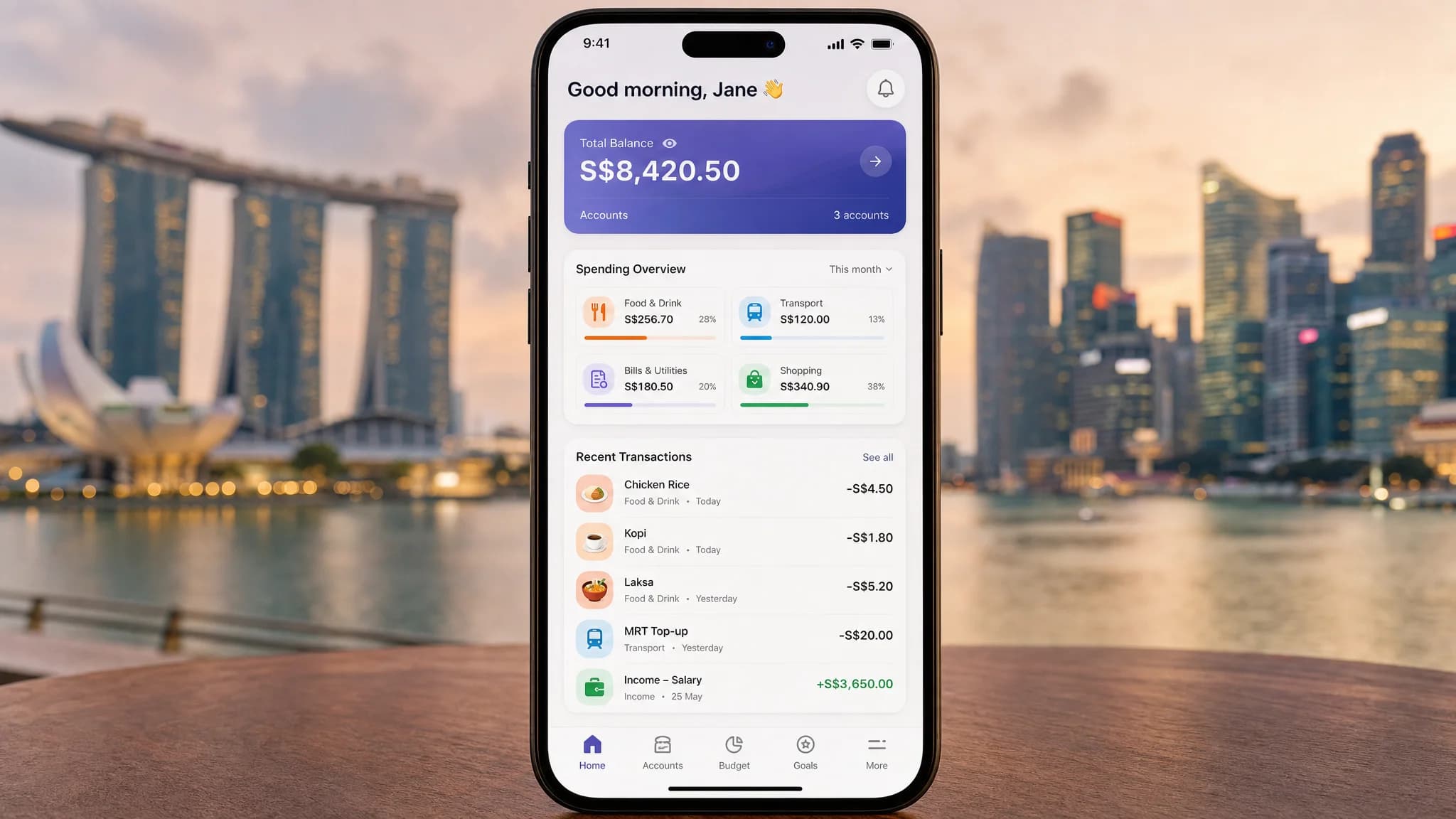
Most budgeting apps fail Singaporeans because they are built for American spending habits. Tipping, Black Friday deals, and 401k references do not match what you actually spend on — hawker meals, Grab rides, and CDC vouchers. If you have been comparing budgeting apps and feeling lost, this guide cuts through the noise. Here are the features that actually matter for your Singapore bank accounts, your daily spending, and your peace of mind.
<2>Why Most Budgeting Apps Fail SingaporeansThe Singapore personal finance space is crowded with apps designed overseas and retrofitted for local use. The result is a poor fit across five key areas.
<3>The US-Centric Design ProblemMost budgeting apps default to US spending categories. You will see tipping as a default category. You will see mortgage principal as a major category. Neither reflects how Singaporeans actually spend. When an app forces you to categorise hawker spending under restaurants, you lose visibility into what truly defines your monthly outgoings.
<3>Bank Integration GapsMany apps claim Singapore bank support but offer shallow integration. You might get transaction feeds, but categorisation breaks down. Some apps do not read PayNow transfers correctly. Others confuse intra-bank transfers with actual spending. Before you commit to any app, verify that your primary bank — whether DBS, OCBC, UOB, or Maybank — syncs cleanly with accurate merchant names and correct amounts.
<3>Missing Singapore Spending CategoriesYour spending pattern is distinct. Hawker centre meals. Grab rides. Shopee orders. CDC voucher redemptions. Utilities paid through GIRO. Property tax. These are not exotic edge cases — they are the core of a Singapore household budget. An app that cannot separate hawker spending from restaurant dining misses the point entirely.
<3>Currency ConfusionSome apps display everything in USD with a SGD toggle that feels like an afterthought. You end up doing mental currency conversions every time you review your spending. A proper Singapore budgeting app should be SGD-native — GST-inclusive figures, PayNow amounts shown as-is, no foreign exchange overhead.
<2>The 10 Must-Have Features for Singapore Budgeting AppsThese are the features that genuinely matter based on how Singaporeans earn, spend, and save. Every app you evaluate should be measured against this checklist.
<3>1. Singapore Bank Integration — DBS, OCBC, UOB, Maybank Direct SyncDirect bank syncing via open banking APIs is non-negotiable. Manual entry fails within two weeks — everyone stops doing it. The app must support real-time or daily transaction pulls from the four major Singapore banks. Test the sync before committing: log in, wait 24 hours, and check whether transactions appear with correct merchant names, not generic bank descriptions.
<3>2. SGD-First Design — No Currency Conversion, GST-Inclusive DisplayEvery figure in the app should be in SGD. Budget limits should reflect GST-inclusive prices. If you are setting a S$50 weekly food budget, you should see S$50 — not USD equivalents or confusing multi-currency fields. GST is 9% on most goods and services — your budgeting app should reflect the real cost of living.
<3>3. Hawker and Food Court CategorisationSingaporeans spend significantly at hawker centres and food courts. This is not restaurant spending — it has different frequency, different amounts, and different nutritional value. The app should either auto-detect hawker and food court transactions or let you create a custom category that sits separately from restaurant dining.
<3>4. Grab and Shopee IntegrationGrab is not just transport — it is food delivery, groceries, and insurance payments. Shopee is retail, bills payment, and logistics. A Singapore-centric budgeting app should either auto-categorise Grab and Shopee transactions or let you create dedicated categories that make sense for your household. If you use either service daily, you need visibility into how much you are spending across their ecosystems.
<3>5. PayNow Transaction RecognitionPayNow is fundamental to Singapore banking. When you receive money from a friend for lunch, split a utility bill, or pay your landlord, those transfers should be categorised correctly — not flagged as income or mislabelled as a generic bank transfer. Poor PayNow handling creates noise in your transaction history and makes your actual spending picture unclear.
<3>6. CPF Contribution TrackingCPF is a significant portion of your financial life. While you cannot directly sync CPF data through most budgeting apps, the best ones let you manually add CPF contribution estimates or at least account for CPF cash payouts when modelling your monthly cash flow. For self-employed Singaporeans or those on contract work, this is especially valuable.
<3>7. Subscription DetectionNetflix, Spotify, Disney+, gym memberships, iCloud storage, Microsoft 365 — subscriptions quietly eat into your budget. A good budgeting app auto-detects recurring charges and presents them clearly. Some apps will even flag subscriptions you have not used in 90 days, helping you decide whether to cancel. With Singapore high digital service adoption, this feature alone can pay for a premium subscription many times over.
<3>8. Budget Alerts That Work — Before You OverspendMost apps notify you after you have already blown your budget. That is not alerting — it is reporting. The apps that actually help you save notify you when you are at 80% of a category limit, with enough lead time to adjust. Push notifications should be timely, actionable, and not spammy. If you start ignoring the alerts within a week, the feature is not working.
<3>9. Offline ModeSingapore MRT system has dead zones. The North-South Line between Jurong West and Bishan, the Circle Line tunnels, and parts of the East-West Line will cut off your connection. If the app requires constant connectivity to show your budget, you will be blind during your commute. A proper budgeting app caches your data and works offline, syncing when you reconnect. This is not a nice-to-have — it is a usability requirement.
<3>10. Data ExportYour financial data belongs to you. Any app that does not let you export your transaction history as CSV or PDF is a red flag. If the app shuts down, changes its terms, or raises prices beyond what you are willing to pay, you should be able to walk away with your data intact. Data portability is a fundamental right in the age of open banking.
<2>Nice-to-Have Features (If You Have Specific Needs)These features do not break a budgeting app, but they add real value depending on your situation.
- Multi-currency support — essential for frequent travellers, expats, or anyone with overseas income
- Investment tracking — stocks, REITs, and Singapore Savings Bonds alongside your spending data
- Bill splitting — shared expenses with roommates, partners, or family members
- Receipt scanning with OCR — digitise paper receipts from supermarkets and hawker stalls
- Shared budgets for couples — combined visibility into household spending
- Goal-based savings trackers — visual progress toward a holiday, home deposit, or wedding fund
- Credit card payoff calculator — plan your way out of credit card debt systematically
- Net worth dashboard — see your full financial picture including assets and liabilities
These features or policies should make you reconsider any app that includes them.
- Mandatory credit card linking — some apps require a credit card to unlock basic features; this is a privacy and debt risk
- No offline mode — if the app does not work without internet, it will fail you during your commute
- USD-first design — constant currency toggling signals that Singapore was an afterthought
- No data export — if you cannot download your data, you are locked in and vulnerable
- Hidden subscription fees after free trial — transparent pricing should be visible before you sign up
- No customer support in compatible time zones — if support operates on US hours only, you will wait days for responses
- Categories that do not match Singapore spending — if tipping, Black Friday, or US tax categories dominate the defaults, the app was not built for you
Do not rely on app store ratings alone. Follow this six-step evaluation framework before you trust an app with your financial data.
- Test the free trial with real transactions — use the app for at least one full week with your actual bank transactions
- Check if your primary bank syncs correctly — log into the app and verify that transaction descriptions, amounts, and dates are accurate
- Verify hawker and food court categorisation — look at your food transactions and confirm they are categorised in a way that makes sense for your budget
- Review the privacy policy — check where your data is stored and whether it is shared with third parties for marketing
- Confirm the cancellation process — if you decide the app is not for you, can you cancel within two minutes? Dark patterns here are a red flag
- Read recent Singapore user reviews — focus on reviews from the last three months to see current app performance, not outdated versions
Budgeting apps in Singapore range from free to S$15 per month. Here is what to expect at each tier.
<3>Free TierMost apps offer a free tier with meaningful limitations. Common restrictions include one connected bank account, basic transaction viewing without insights, and no data export. Free tiers work well if you have a simple financial situation — single income, one bank account, straightforward spending patterns. They are a good starting point for learning how to track expenses systematically.
<3>Paid Tier — S$5 to S$15 per MonthPremium features typically include unlimited bank connections, advanced insights, budget alerts, data export, and offline mode. At S$5–S$15 per month, the cost is roughly equivalent to one hawker meal. If the app helps you identify S$50 or more in savings per month — whether from cancelled subscriptions, reduced discretionary spending, or better visibility into your habits — it pays for itself immediately.
<3>Annual Subscription DiscountsAnnual plans typically offer 20–30% off the monthly rate. If you are committed to budgeting long-term, an annual plan reduces friction. However, only commit to an annual plan after testing the free or monthly tier for at least four weeks. If you forget to cancel a trial and get auto-charged for a year, that is on you — but a dark pattern cancellation flow is on the app developer.
<3>When Paying Makes SenseUpgrade to a paid plan when you need multiple bank connections, want budget alerts, or require data export. If you are serious about building a sustainable budgeting habit and the app provides meaningful insights beyond what you can calculate manually, the investment is justified.
<2>Privacy and Security — What Singaporeans Need to KnowSingapore Personal Data Protection Act (PDPA) governs how companies handle your data. When you connect your bank account to a budgeting app, you are trusting that company with your complete financial picture. Here is what to verify before you hand over access.
<3>Data Storage LocationCheck whether the app stores data in Singapore, the United States, or elsewhere. Singapore-based storage is preferable for PDPA compliance and latency. US-based services fall under different legal jurisdictions, which may affect how law enforcement can access your data.
<3>Encryption StandardsLook for 256-bit AES encryption at rest and TLS 1.2 or higher for data in transit. These are industry-standard protections that most reputable apps implement. If an app cannot confirm basic encryption standards, do not use it with your financial data.
<3>Two-Factor Authentication2FA should be available and encouraged, not buried in settings. At minimum, look for SMS or authenticator app-based 2FA. Biometrics alone are convenient but can be bypassed with sufficient motivation. A second factor that you know (a PIN or password) combined with something you have (your phone) is the baseline.
<3>Data Sharing PoliciesRead the privacy policy — or at least the summary — before connecting your bank. Some apps monetise anonymised spending data by selling it to market research firms or financial institutions. If you are uncomfortable with your spending patterns being used for advertising targeting, choose an app with a clear no-selling-of-data policy.
<3>Account Deletion ProcessCan you fully delete your account and all associated data? This should be a self-service option, not a support ticket that takes three weeks to process. The best apps let you download everything and then delete your account from within the app settings.
<2>FAQ — Budgeting App Features Singapore- Which budgeting app works best with DBS, OCBC, or UOB?
- Most major budgeting apps in Singapore support DBS, OCBC, and UOB through open banking connections. The best approach is to test the free tier with your specific bank before committing. Support quality can vary between banks even within the same app.
- Can budgeting apps track CPF contributions?
- Direct CPF sync is not typically available through consumer budgeting apps. However, you can manually add CPF contribution estimates or use CPF statement downloads to get a partial picture. Some apps let you set a fixed monthly CPF contribution as a savings goal.
- Are budgeting apps safe to use in Singapore?
- Safe, if you choose an app with proper encryption, 2FA, and a clear privacy policy. Never give budgeting apps access to your bank login credentials directly — legitimate apps use read-only open banking connections. Check that the app complies with PDPA and stores data securely.
- Do I need to pay for a budgeting app?
- Not necessarily. Free tiers work for simple budgets with a single bank account and straightforward spending. Paid tiers add value when you need multiple bank connections, advanced insights, budget alerts, and data export. Evaluate whether the premium features justify the cost for your situation.
- Can I use a free budgeting app effectively?
- Yes, if your financial situation is simple. One bank account, regular income, and basic spending categories are well within free tier capabilities. The key is consistency — the app is only useful if you actually open it and review your spending regularly.
- What happens if the budgeting app shuts down?
- If the app shuts down without warning, you lose access to your data unless you have exported it. This is why data export — CSV or PDF — is a must-have feature. Download your transaction history at least quarterly. Do not rely on any app storing your financial data indefinitely.
- Can I export my data if I switch apps?
- That depends on whether the app supports data export. Check before you sign up. Ideally, the app should let you export all transactions as CSV and your budget settings as a file you can import elsewhere. If exporting is not supported, you are locked in.
- Do budgeting apps work offline in Singapore?
- Some do, some do not. If you need to check your budget during your MRT commute or in areas with poor reception, verify that the app caches your data locally and works without a live connection. This is a practical requirement for anyone who spends time on Singapore public transport.
Before you commit to any budgeting app, the most important step is understanding your spending patterns. If you want a practical starting point without downloading anything, learn how to track expenses using a method that works for you — whether that is a spreadsheet, a notebook, or a simple app. Understanding your cash flow is the foundation every budgeting system builds on.
Once you have a handle on where your money goes, choosing the right budgeting app becomes much clearer. You will know which features you actually need — bank sync, hawker categorisation, Grab tracking — rather than being overwhelmed by options that do not match your spending life. The best budgeting app for Singaporeans is the one you will actually use consistently.
Take control of your money today
Start free with Spendmate — track expenses, plan budgets, and reach your financial goals.
Start free with Spendmate