
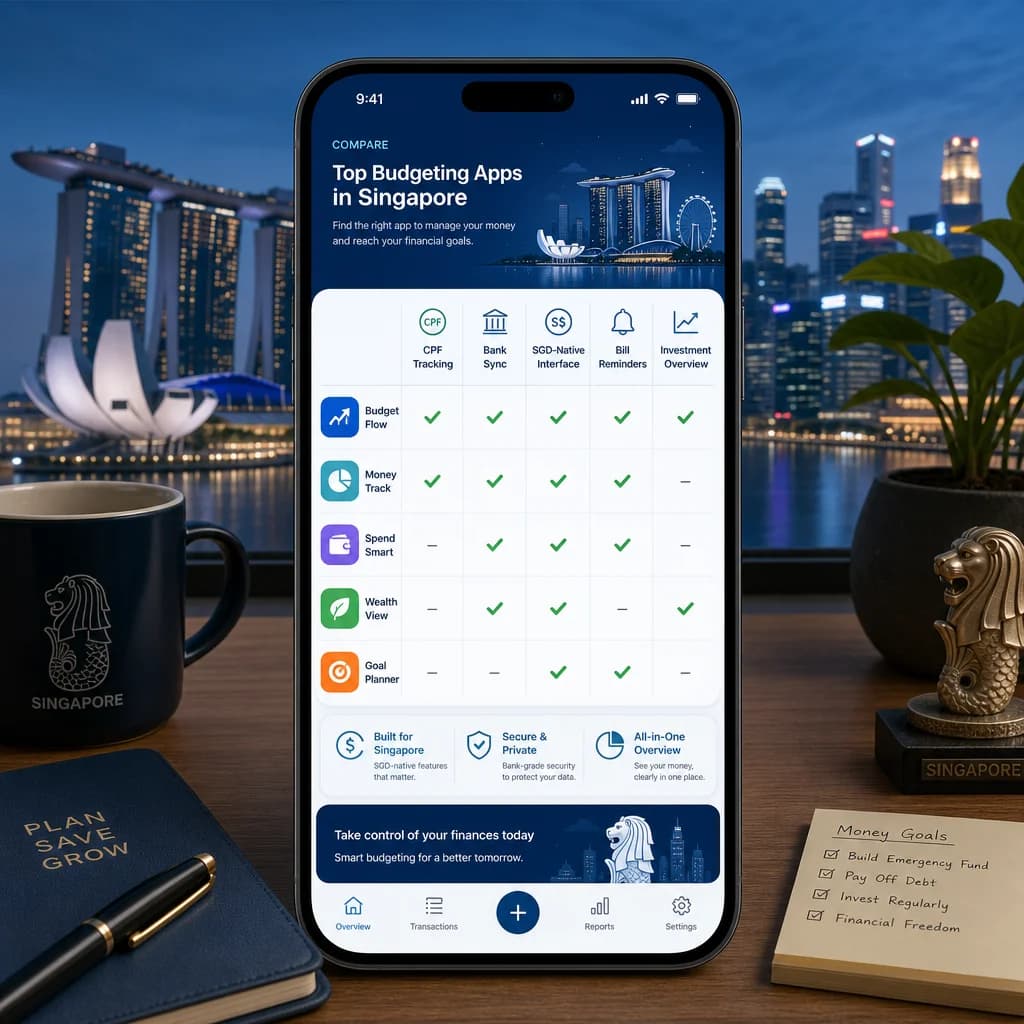
Most budgeting apps are built for Americans with credit cards and 401(k)s. You have PayNow, CPF, and hawker centre cash spends. Here's what actually matters when choosing a budgeting app in Singapore — and how to pick the one that fits your life, not a generic global reviewer's checklist.
Why Most Budgeting Apps Fail Singaporeans
If you've tried a budgeting app and given up, you're not alone. Here's why most apps disappoint Singaporean users:
- Built for US credit card culture, not Singapore debit and PayNow reality
- CPF tracking is invisible — your largest asset goes unmonitored
- Currency defaults to USD, with SGD as an afterthought
- Bank sync promises that don't actually work with DBS, OCBC, or UOB
- Category systems that don't recognize hawker centres, NTUC, Sheng Siong, or FairPrice
The gap isn't about discipline. It's about fit. A budgeting app that ignores CPF, can't categorize your hawker centre breakfast, and treats PayNow transfers like wire transfers isn't built for you. Here's what actually matters in 2026.
The 10 Features That Actually Matter for Singapore Budgeting
Not every feature matters equally. Based on how Singaporeans actually earn, spend, and save, these ten features make the difference between an app you stick with and one you delete after two weeks.
1. Singapore Bank Integration — The Reality Check
Bank sync sounds great until you try it with a Singapore bank. Most budgeting apps claim 'bank-level security' and 'auto-sync,' but when you actually connect your DBS or OCBC account, transactions show up days late — or not at all.
The honest picture: most budgeting apps don't have real-time API access to Singapore banks. What you get instead is aggregators like Plaid that may not support your specific bank product. Before you commit, check whether the app supports your bank directly, how often transactions sync, and whether PayNow transfers are recognized as a category or lumped into generic 'transfer' bins.
2. CPF OA/SA Tracking — Your Biggest Asset Deserves Attention
Here is the feature that most global budgeting apps completely ignore: your CPF Ordinary Account (OA) and Special Account (SA) are likely your largest financial asset. Yet no mainstream budgeting app — not YNAB, not Mint, not any of the big international names — tracks CPF contributions automatically.
For Singaporeans, CPF represents a significant portion of retirement savings. An app that lets you manually log CPF contributions, set OA/SA balance targets, and track monthly interest accrual gives you a much more complete picture of your net worth than one that ignores it entirely. This is a genuine local differentiator — and if an app does it well, that's worth paying attention to.
3. Cash + Digital Hybrid Tracking
Singaporeans use cash more than global finance media acknowledges. Hawker centre meals, market purchases, and small vendors still run on cash. At the same time, you're also using GrabPay, PayNow, and Nets. A budgeting app that only tracks digital transactions will systematically undercount your actual spending.
- Quick-add cash transactions in under 10 seconds
- Receipt photo capture with OCR for GST-inclusive receipts
- Weekly cash envelope system compatibility
- Separate tracking for hawker cash vs restaurant card payments
The best apps for Singapore handle both without making you feel like you're doing double-entry bookkeeping every time you buy rojak.
4. SGD-Native Experience
Default currency matters more than it sounds. Apps that default to USD or EUR force you to constantly mentally convert, and reports come out in the wrong currency. An SGD-native app should default to SGD on first launch, show GST breakdowns on receipts natively, recognize local merchants by default, and align with Singapore's salary credit cycle.
5. Smart Categorization That Learns Singapore Spending
Generic budgeting apps categorize Grab rides as 'transport' and GrabFood as 'dining out.' For Singaporeans, this is a problem. You spend significantly more on Grab than the average Western user, and the app should recognize that pattern — not just dump everything into generic buckets.
- Auto-categorizes Grab rides, GrabFood, and FoodPanda separately
- Recognizes NTUC, FairPrice, and Sheng Siong as groceries — not 'shopping'
- Distinguishes hawker centre meals ($4-$6) from restaurant dining ($30-$80)
- Learns your personal spending patterns over time and adjusts categorizations accordingly
6. Budget Goals Aligned to Singapore Life
Singapore-specific financial goals require Singapore-specific goal tracking. A generic budgeting app might let you set a generic 'savings target.' What you actually need is:
- BTO savings goal tracker with countdown and projection
- Emergency fund target based on 6 months of Singapore expenses (rent, transport, food)
- Travel fund tracker (Singaporeans travel frequently — this is a real category)
- Annual insurance premium planner for life, health, and car insurance
Apps that understand Singapore's financial lifecycle — from BTO to renovation to retirement — provide more useful goal tracking than ones designed for a generic Western middle class.
7. Subscription and Recurring Bill Management
Singaporeans subscribe to Netflix, Spotify, Disney+, gym memberships, and mobile plans from Singtel, StarHub, and M1. An app that automatically detects recurring charges and flags them helps you catch subscription creep — a silent budget killer.
- Auto-detects recurring subscriptions from transaction data
- Annual premium reminders for insurance renewals
- Gym membership tracking (ActiveSG, boutique gyms, chain memberships)
- Phone plan billing cycle awareness
8. Multi-User and Household Support
If you're budgeting as a couple or a family, you need an app that handles shared expenses without forcing you into a spreadsheet marriage.
- Shared and individual expense tracking for couples
- Family expense splitting with allocation tracking
- Shared financial goals (BTO down payment, renovation, holiday travel)
- Permission controls so both partners can see what they need to see
For couples managing different income levels, shared visibility into both joint and individual spending is essential. If you want a deeper system for managing money as a couple, our guide to budgeting with different incomes covers the approach in detail.
9. Data Privacy and Security
You're handing an app access to your entire financial life. In Singapore, that means PDPA compliance matters.
- Data stored on Singapore-based or regional servers (check the privacy policy)
- Bank-level AES-256 encryption for all data in transit and at rest
- PDPA compliance — the app should state this explicitly
- No selling of transaction data to third parties for marketing
The Monetary Authority of Singapore (MAS) has guidelines on financial data handling. Apps that operate in Singapore should be aware of these. If an app can't clearly state where your data lives, that's a red flag.
10. Price vs Value — Free vs Paid Tiers
Most budgeting apps offer a free tier with limited features and a paid tier ($5-$15/month). Here's what to actually compare: what you get in the free tier (transaction limit, number of accounts, export options), whether the paid tier unlocks features you'll actually use, lifetime deal availability, and student or group discounts if you're applying this to a household of multiple users.
The question isn't 'is this app expensive?' It's 'does this app justify its cost with features I'll actually use?' For a Singaporean in the consideration stage, a $10/month app that tracks CPF, categorizes hawker spending, and syncs with your bank is worth significantly more than a free app that does none of those things.
Evaluation Framework — Score Each App Yourself
Don't rely on someone else's ranking. Use this 10-feature scoring sheet to evaluate any budgeting app based on what's actually important for your life:
- Download or create a simple spreadsheet with the 10 features above as rows
- Score each app you're considering from 1 (poor) to 5 (excellent) on each feature
- Weight features by your personal priority — if CPF tracking matters most to you, give it a 3x multiplier
- Add up weighted scores for a total ranking
- Choose the app that scores highest on features you actually need, not the one with the best marketing
This approach works for any financial decision. If you want a deeper dive into building your first budget from scratch, our beginner's guide to tracking expenses walks through the foundational steps before you even pick an app.
Top 5 Budgeting Apps for Singaporeans — Feature Breakdown
Here's how the most commonly discussed budgeting apps for Singapore stack up on the features that actually matter:
Who Should Choose Which App?
- Choose BudgetWise SG if: You want CPF tracking, an SGD-first experience, and local merchant recognition. You're willing to do some manual entry for bank sync.
- Choose Seedly if: You prioritize community features and honest reviews over bank sync. You don't mind manual transaction entry.
- Choose MoneyLover if: You travel frequently and need multi-currency support alongside Singapore tracking.
- Choose YNAB if: You want zero-based budgeting methodology and can afford the premium price. Bank sync is not a priority.
- Choose manual tracking if: You distrust apps with financial data access entirely (this is a valid concern).
Common Budgeting App Mistakes Singaporeans Make
- Picking an app based on global reviews instead of Singapore-specific fit. A US-centric review will never flag CPF tracking as important.
- Ignoring CPF tracking. Your OA and SA balances are likely your largest financial asset. An app that ignores them is giving you an incomplete picture.
- Not tracking cash spending. If you only track digital transactions, you're missing 20-30% of your actual spending if you're a regular hawker centre visitor.
- Giving up after two weeks. Budgeting habit formation takes 30+ days. If the app feels clunky in week one, give it until day 30 before deciding.
- Over-categorizing. The goal is to understand your spending, not to have a perfect taxonomy. If you're spending more time categorizing than living, you've gone too far.
If you're just starting out and feeling overwhelmed, our guide to tracking expenses without getting overwhelmed covers the minimum-viable approach to expense tracking that doesn't require a full app or a complete system.